Supported Controllers
Robomates uses the Bluepad32 Bluetooth stack, which supports a wide range of gamepads. Most controllers require pairing on the first connection — check the instructions for your specific controller below.
Controllers
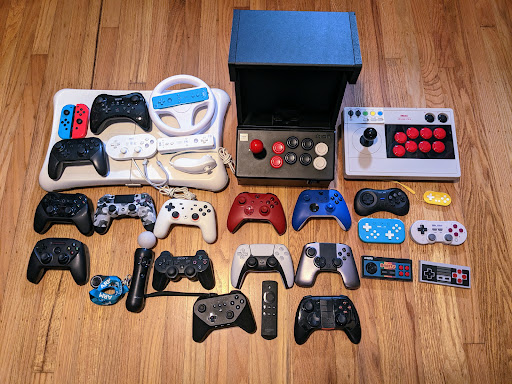
| Controller | Protocol | Pairing |
|---|---|---|
| Sony DualSense (PS5) | BR/EDR | Hold Create + PS button until light bar flashes |
| Sony DualShock 4 (PS4) | BR/EDR | Hold Share + PS button until light bar flashes |
| Sony DualShock 3 (PS3) | BR/EDR | Requires manual pairing |
| Xbox Wireless (model 1708) | BR/EDR or BLE | Press Pair button for 3 seconds |
| Xbox Wireless (model 1914) | BLE | Press Pair button for 3 seconds |
| Xbox Adaptive Controller | BLE | Press Pair button on the back |
| Nintendo Switch Pro | BR/EDR | Hold Sync button on top of controller |
| Nintendo Switch Joy-Con | BR/EDR | Hold Sync button on the rail (each Joy-Con is a separate gamepad) |
| Nintendo Wii U Pro | BR/EDR | Hold Sync button |
| Nintendo Wii Remote | BR/EDR | Press Sync button |
| 8BitDo (SN30 Pro, Pro 2, Ultimate, Lite, Zero 2, M30, etc.) | BR/EDR | Varies by model — all modes supported (Switch, Android, Windows, macOS) |
| Steam Controller | BLE | Hold Y + Steam button (requires BT firmware) |
| Stadia Controller | BLE | Hold Y + Stadia button (requires BT firmware) |
| Android gamepads | BR/EDR or BLE | Varies by model |
Button mapping may differ between controllers. You can customize the mapping for any connected controller
through the Mapping tool in Robomates HQ.