Control System
How Robomates robots stay upright and respond to driver input using nested PID controllers and field-oriented motor control.
Overview
A Robomate is a two-wheeled inverted pendulum — without active control it falls over instantly. The firmware runs two cascaded PID controllers at high frequency to keep the robot balanced while following the driver's commands. The motors are driven in torque mode using SimpleFOC field-oriented control.
What We Control
The most important design decision is what to control. We don't control the tilt angle or motor torque directly — we control velocity.
When the driver gives no input, the target velocity is zero and the robot should stand still. But standing still doesn't necessarily mean zero tilt — the robot may lean slightly to maintain balance depending on its centre of gravity. By targeting velocity rather than angle, the system naturally finds the right posture on its own.
PID Control Diagram
Velocity PID
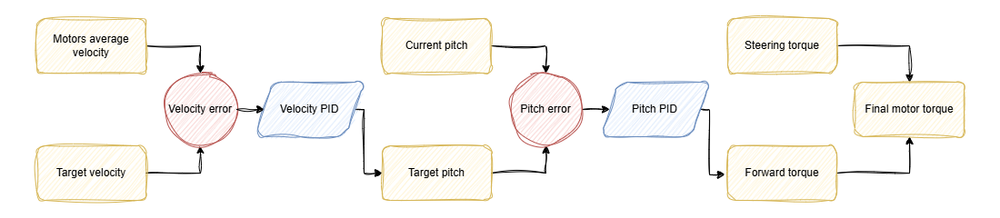
The outer loop compares the target velocity (from the driver's joystick or zero when idle) with the actual velocity (averaged between both motors). The difference is the velocity error.
The Velocity PID controller processes this error and outputs a target pitch angle — the tilt the robot should hold in order to reach the requested speed.
Pitch PID
The inner loop compares the target pitch (output from the Velocity PID) with the current pitch (measured by the MPU6050 IMU). The difference is the pitch error.
The Pitch PID controller processes this error and outputs the forward torque needed to correct the tilt. Since the SimpleFOC motor controller is set to torque mode, this value goes directly to the motors.
Steering
Balancing handles forward and backward movement. To steer left or right, a steering torque is added to one motor and subtracted from the other. The final torque sent to each motor is:
| Motor | Torque |
|---|---|
| Left | Forward torque + Steering torque |
| Right | Forward torque − Steering torque |
This differential drive approach lets the robot spin on the spot or take wide turns depending on how much steering input is applied.
PID Tuning
The firmware ships with default PID values that work well for a standard Robomate build. These can be adjusted via the configuration to account for different top shells, battery weights, or surface conditions.
A few things worth noting about the default tuning:
Summary
| Stage | Input | Output |
|---|---|---|
| Velocity PID | Target velocity vs. actual velocity | Target pitch |
| Pitch PID | Target pitch vs. current pitch (IMU) | Forward torque |
| Steering mix | Forward torque ± steering torque | Final motor torques |
| SimpleFOC | Torque command per motor | Phase currents to BLDC windings |